Read the condition, supplier source and checked date together.
Keep NOC and help desk requirements with the offer they describe.
Send candidates the same workload, hours and response format.
Start with the work.
NOC services
Monitoring, triage, approved fixes and infrastructure escalation.
Help desk services
End-user contacts, supported requests, service hours and ticket ownership.
After-hours coverage
Plan staffed hours, on-call activation and the next accepting owner.
Provider comparisons
Compare entry conditions, team models, charging units and named tools.
PUBLISHED NOC CONDITIONS
Three starting points for a NOC shortlist.
Examples from the 32-provider directory. Open a profile for its full service context.
| Provider | Published condition | Decision to settle |
|---|---|---|
| Mission Control NOC | No client-count minimum is advertised on the Halo landing page. Request the minimum spend and device commitments for the proposed service. Source / 2026-10-15 (external website) NOC and help desk offered by device and time; no numeric rate in the reviewed FAQ. Source / 2026-10-15 (external website) | Which devices, hours and notice terms apply to the order? |
| NOC 24/7 | Per endpoint per month; no numeric rate is shown on the reviewed pricing page. Source / 2026-10-15 (external website) No setup fee on standard onboarding; confirm whether the proposed setup is standard. Source / 2026-10-15 (external website) | How are endpoint weights and custom setup reflected in the quote? |
| Worksent | Minimum of 50 devices for the NOC service. Source / 2026-10-15 (external website) The NOC service page says month-to-month, while the general partnership FAQ describes a standard three-month term. Confirm the applicable service agreement and notice period before treating the NOC as a monthly commitment. General FAQ / 2026-10-16 (external website) NOC service page / 2026-10-15 (external website) | How is the published device minimum counted, and how does the chosen POD affect price? |
THE OPERATING BOUNDARY
Write down who owns the next action.
Give the supplier a service schedule your team can operate from. Choose a buying guide for identity checks, backup recovery, patching or your PSA/RMM workflow, then bring its questions into the request.
Use the buying checklist →- Define the requests.
State clients, devices, contact channels, applications and service hours.
- Assign the actions.
Separate permitted fixes, approval decisions and retained MSP work.
- Define the timers.
Set acknowledgement, work start, mitigation, restore and resolution independently.
- Price the same scope.
Compare the recurring fee, minimum, usage, transition work and your own management time.
BUYING TOOLS / NO REGISTRATION
Turn the scope into a request.
Select the sections you need, copy the request and compare the responses.
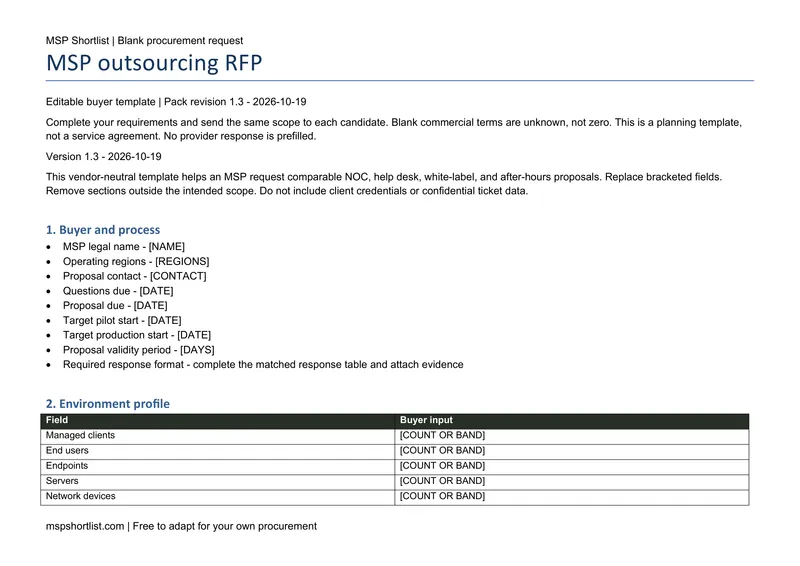
The editable request has twelve sections for scope, service levels, pricing and transition. Buyer details and provider response fields are blank.
Build your RFP.
Choose sections and download the Word template and response workbook.
→02 / Cost modelModel the delivery cost.
Use your own productive hours, demand, coverage and quoted charges.
→03 / Buying worksheetsCompare the replies.
Work through the quote and SLA worksheets with the same requirements.
→PROVIDERS / YOUR SHORTLIST
Explore 32 providers.
Filter by the service and conditions you need, then select up to three providers for a side-by-side view.